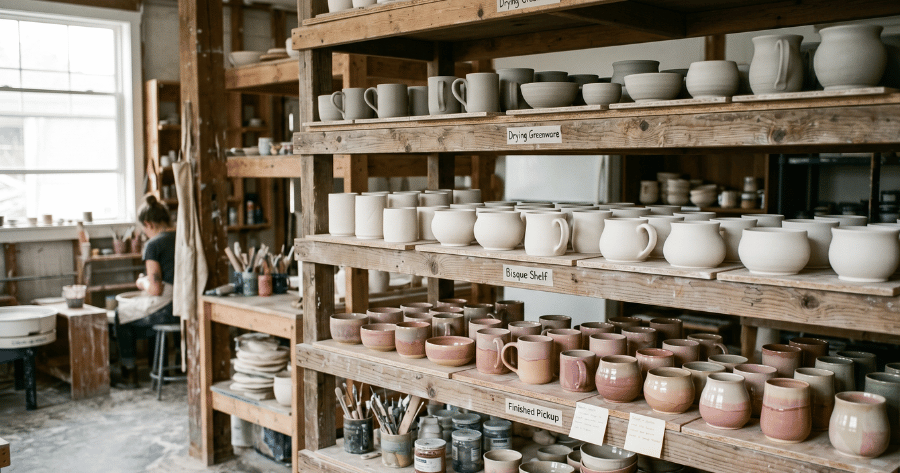
Here's a thing every studio owner learns the hard way: your studio already has a workflow. A piece gets made, it dries, it's fired, maybe glazed and fired again, then it sits on a shelf until someone collects it. The stages exist whether or not you've ever written them down. The trouble starts when they only live in your head — because then they only work when you're the one on the floor.
Writing that workflow down is the cheapest upgrade I ever made to how our studio runs. It cleaned up the handoffs between staff, it tells you at a glance where every piece is, and it's the foundation for notifying customers automatically. Let's build yours.
On this page
Why an explicit workflow matters
An unwritten workflow works fine right up until it doesn't: a busy Saturday, a new staff member, a customer who swears their piece should be ready. A workflow you've actually defined gives you four things you can't get otherwise:
- Visibility — anyone can look at a piece (or a screen) and know exactly what stage it's at.
- Clean handoffs — the person loading the kiln and the person at the counter share the same language.
- Better customer communication — you can tell customers what happens and when, and mean it.
- Far fewer lost pieces — a piece that's always at a known stage, in a known place, doesn't go missing.
The classic stages (two examples)
There's no single correct list — it depends entirely on what your studio does. Compare these two:
Paint-your-own-pottery
- Painted & registered
- Glazed & fired
- Ready for pickup
- Collected
Full clay studio
- Greenware (made)
- Drying
- Bisque fired
- Glazed
- Glaze fired
- Ready for pickup
- Collected
Same idea, very different lists. The PYOP studio's customer never touches greenware; the clay studio's member is involved at almost every step. This is the heart of it: your studio, your way. A workflow borrowed from someone else's studio will always have stages you don't need and miss ones you do.
Map your own workflow
Grab a pen. This takes ten minutes:
- List every physical step a piece goes through, from the moment it exists to the moment it leaves with its owner. Don't filter yet — write them all down.
- Mark the customer-facing milestones. Which steps does a customer actually care about? Usually: "we've got it", "it's fired/finished", "it's ready to collect".
- Decide which steps trigger a message. Only the milestones above need to ping the customer. Everything else is internal.
What you're left with is a clean list of statuses, and a much shorter list of "moments that send a notification". That's your workflow.
Turn stages into status
A workflow only earns its keep when each stage maps to two concrete things:
- A place — a shelf or zone where pieces at that stage live. "Ready for pickup" should be a specific, labelled spot, not "somewhere on the back shelves".
- A message — what, if anything, the customer hears when a piece reaches that stage.
The mechanics need to be fast, or they won't happen on a busy day. With a proper tracking system, moving a piece to the next stage is a single tap, and the right customer message goes out automatically. This is exactly what ClayTrack is built around: you define your own stages once, decide which ones notify customers, and from then on a one-click status change handles the shelf logic and the email or SMS in one move — all under your studio's branding.
PYOP vs clay vs membership studios
Three studios, three workflows:
- PYOP — short and customer-light. The customer paints, you do the rest, they come back. Three or four statuses is plenty.
- Wheel / hand-building classes — longer, with drying and two firings, and the maker is hands-on throughout. More statuses, more internal handoffs.
- Membership / open studio — members make work continuously, so you're tracking dozens of pieces per person across every stage at once. Here, searchability and clear per-stage shelves matter most.
Because these are genuinely different, a tool with fully custom workflows beats a fixed template every time. If you run more than one model under one roof — say PYOP up front and classes in the back — you'll want separate workflows that still live in one system.
Three common mistakes
- Too many statuses. If a stage doesn't change where a piece lives or what you tell the customer, it doesn't need to exist. Granularity you don't use is just friction.
- No owner for a stage. Every stage should have a clear "who moves it forward". Pieces stall in the gaps between people.
- Statuses that notify no one. The whole point of "ready for pickup" is that it reaches the customer. A status that doesn't trigger a message is a missed opportunity to clear your shelves.
Get the map right and the rest of your operation gets quieter: fewer "is mine ready?" messages, fewer lost pieces, and a studio that runs the same whether or not you're the one standing in it.
Frequently asked questions
How many stages should a pottery workflow have?
Enough to be useful and no more. PYOP studios often need just three or four; full clay studios may need six or seven. If a stage doesn't change where a piece lives or what you tell the customer, it probably doesn't need to be its own status.
Should every studio use the same workflow?
No. PYOP, wheel-throwing and hand-building flows all look different. Map your own physical steps and build a status list that matches — which is why fully customisable workflows fit real studios better than a fixed template.
Which stages should notify the customer?
Only the milestones they care about: registration confirmation, when the piece is fired or finished, when it's ready to collect, plus pickup reminders. Internal steps like drying or loading the kiln don't need a message.